Senin, 15 Agustus 2011

Promote Your Site For Free

Promote Your Site For Free

Most ways to get free traffic to your website. Although, autosurf programs are easier and faster way to do it, they do not send targeted visitors to your site. In this post I will explain free resources to get free traffic to your website.

Web Directory Submission

Submitting your site in free directories is one of the easiest way to get traffic. Free directory submission may not get you a lot of traffic but it will certainly increase your rank in search engines. For free directories search "directory" in google.com. Here are the some free submission directories that I found for you. One thing you have to keep in mind is, when you submitting your site, make sure to choose the category that suits best to your site. Just submitting to any category does not send you targeted visitors.

Search Engine Submission

There are many websites offers free web submission. However, I prefer submitting my site manually. You can do this free at yahoo, google, jayde, and alexa. If you want to use web submission services then I strongly recommend WEB CEO. Web CEO comes free and provides great functionalities such as URL submission to more than 200 search engines, link exchange, keyword analyses and many more.

Link Exchange

Link exchange is another way to get free traffic to your website. However, you need to be selective, when it comes to choose the sites for link exchange. If you exchange links with similar sites to yours, that would help your page ranking. Also try to put your links in high ranking websites as it also helps your search engine ranking. Just be nice to the webmaster and ask for link exchange. In most cases they will say no but don't give up. (If you be nice I can exchange link with you as well).

Emails ( NOT SPAM )

One of the best ways to get free traffic is emails. Just let your friends know about your website. Use your website URL as your signature in all your mails. Also you can ask your friends to do the same for you. Every ones a while send newsletters to your friends about your website and ask them to forward this to their contacts. You will be surprised how much traffic you will get from this. Also I have to mention this DO NOT SPAM.

Forums and Groups

There are lots of discussion forums and groups available that discuss about various topics. You can become members to these forums. Post regular comments to these forum by using your URL as your signature. Just don't send your URL as it will look really unprofessional and you will end up excluded. Talk about whatever the group or forum is about. BECOME A REGULAR.

Blogs

Create blogs that links to your website. You can easily set up a blog for free. Google, yahoo, msn are provides free blog hosting services.

Tags : Promote Your Site For Free, blog, Forums and Groups, Emails ( NOT SPAM ), Link Exchange, Search Engine Submission, Web Directory Submited

How to Secure Facebook Account

How to Secure Facebook Account

How to Secure Your facebook Account?
Facebook users do not read the Facebook official blog might have missed the important updates on privacy and security enhancements. Facebook latest features are added as opt-in features, which probably means that majority of Facebook members might have not turned on or enabled them yet on their accounts.

Here are the important changes and short guides to improve and fully protect the login, password, and security of your Facebook profile.

Protect and Secure Facebook Account
Some of the latest features are about Facebook login safety. That includes a very strong account password. A strong password means you have to combine letters, special characters, and numbers. Make your password at least 10 characters long. But, for safety, it is recommended to make it 15 or more characters.

Add Your Mobile Numbers
Following This steps:

Image 1


Image 2

Image 3


1. Log in to Facebook.
2. On the top right of your screen, click on Account.
3. Select Account Settings.
4. Look your Left side Mobile Tab. Click on Mobile Tab.
5. Click on +Add a Phone Tab. ( View Image 1)
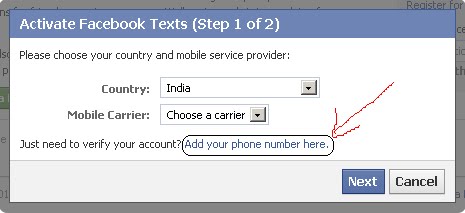
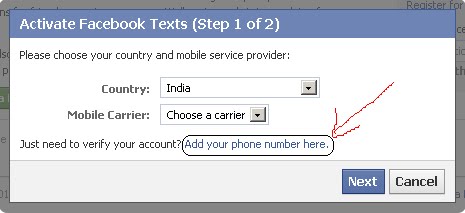
6. Open New Windows Automatic. Click on Add your phone number here ( View Image 2)
7. Open New Windows Automatic. and Type your Mobile Number in the Phone Number field. ( View Image 3)
8. Click on the Confirm button. and open New Windows.
9. Your Mobile inbox in Sent Confirm Code.
10. Type your Code in the Code field.
11. Click on the Confirm button.

How to Change Facebook password?
If you want to edit your password and make it a strong one, follow these steps:

1. Log in to Facebook.
2. On the top right of your screen, click on Account.
3. Select Account Settings.
4. Look for Password.
5. Click on Edit Password.
6. In the Current Password field, type your current password.
7. Type your New strong password in the New Password field.
8. Re-type your new strong password in the Confirm Password field.
9. Click on the Save Changes button.

Benefits of Secure Browsing
When you turn this feature on, your activities on Facebook becomes encrypted, this means it will be harder for anyone else to access your Facebook account without your knowledge and permission. This feature is not currently available for Facebook mobile browsing.

Login Notifications
Login Notifications feature alerts you by sending an email each time your Facebook account is accessed from a new computer or mobile device.

Follow this steps:
1. Log in to Facebook.
2. On the top right of your screen, click on Account.
3. Select Account Settings.
4. Look your Left side Security Tab. Click on Security Tab.
5. Click On Login Notifications Tab.
6. Check the box under Email and Text message.
7. Click on the Save Changes button.

Login Approvals
Login Approvals is a security feature similar to Login Notifications, but with an extra security step. With Login Approvals, each time you try to log in to your Facebook account from an unknown device such as any computer or mobile phone you haven't named and saved to your Facebook settings, you will first have to enter a security code that's been sent to your mobile phone.

To turn on your account's Secure Browsing (https), Login Notifications, and Login Approvals settings:

1. Log in to Facebook.
2. On the top right of your screen, click on Account.
3. Select Account Settings.
4. Look your Left side Security Tab. Click on Security Tab.
5. Check the box under Browse Facebook on a secure connection (https) when possible.
6. Click on the Save Changes button.

Let us know what you think about improving and upgrading your Facebook account protection by adding a comment below. submit your any problems in comment and i solve your problems.

Tags : How to Secure Facebook Account, Facebook

Block or Remove Blogspot Follower User


Block or Remove Blogspot Follower User
Some Blogspot follower user use Adult and sexy image. If you are having blogger blog, you will have followers widget for every blog by default. In this case any visitor can become your follower. Now if you wanted to moderate it and blog any follower here are some simple steps to do this. Or else if you wish to Add the follower as friend then also check the below 8 steps.

1. Login to Blogger.com

2. Here, for every blog of you an see followers link if it has minimum one, as you can see in bellow image my blog has 101 Followers

3. Click on Followers Link for the blog for which you want to block some follower

4. It will show list of followers as shown in bellow image.

5. Now click on the picture of the follower which you wanted to block
block, or, removal, remove, block, follower, user, http://linuxallopensource.blogspot.com

block, or, remove, blogspot, follower, user, http://linuxallopensource.blogspot.com

6. This will show updates and links of follower as well as link for blocking the follower.

block, or, remove, blogspot, follower, user, http://linuxallopensource.blogspot.com

7. Click on Block This User Link and follow the steps and the follower gets blocked from following your blog.

8. If you don't want block the follower but add as a friend then click on Add as friend as shown in the above image.

Tags : Block or Remove Blogspot Follower User , Blogspot

Asbestos Lawyer - Mesothelioma

Asbestos Lawyer - Mesothelioma
Mesothelioma is often referred to as "asbestos disease" because it usually results from exposure to asbestos, either directly or indirectly. Lawyers are often needed by people suffering from Mesothelioma, in order to obtain compensation from the relevant companies. The claims awarded are often considerable sometimes in excess of tens of millions of dollars.

Since some lawyers will often take on asbestos related cases on a "no win no fee" basis, it need not cost anything initially to get legal help in obtaining a settlement for Mesothelioma. Also, since settlements are usually completed before the final court case, the person suffering from asbestos disease will rarely have to actually appear in court.

Finding the best lawyer to handle the case is obviously relevant. Most states in the US (as well as most areas in the UK, Canada and Australia, where most other cases occur) have lawyers who can handle such cases, but sometimes it might be better to work with a more accomplished lawyer from elsewhere. Some lawyers specifically state that they will work with claimants from various US states.

Jobs where workers are exposed to asbestos include shipbuilding, boiler making and lagging (because asbestos is used to insulate boilers), electricians, carpenters etc. (who might have to drill or cut asbestos), pipe fitters and plumbers (because asbestos is used to insulate pipes), motor mechanics (because asbestos is used for brake pads and clutches), fire fighters, and other occupations.

As well as obtaining compensation for the disease itself, claims can be made for travel expenses to medical facilities, care given (whether paid for or not), loss of earnings, items bought due to the disease, and loss to family members.
Someone with mesothelioma having made a claim for state benefits does not usually prevent a legal claim from being made.

Tags : Asbestos Lawyer - Mesothelioma

Related Post :
Source http://asbestoscancermesothelioma09.blogspot.com

The History of Asbestos

The History of Asbestos - Asbestos derives its meaning from the Ancient Greeks, meaning "inextinguishable," because of its harmful biological effects. A person who is exposed to asbestos may contract a disease known as asbestosis. This respiratory disease scars the tissue in the lungs. The lungs are prevented from freely exchanging gases, as well as, expanding and contracting properly.

Additionally, Lung Cancer or Mesothelioma can develop. Lung Cancer and Mesothelioma are highly aggressive diseases that are usually the result of exposure to asbestos that has occurred over a long period of time. Treatment options are expanding but there is currently no cure.

Discovery of the Harmful Effects of Asbestos

Asbestos was first diagnosed in 1924 when a young woman died in her twenties after being exposed. Eventually, studies performed on English workers showed that asbestos presented a real risk and exposure could cause sickness and even death.

Unfortunately, the United States did not act on this information immediately. Workers continued to be exposed to this harmful substance and it would be years before the extent of the damage was know. This harmful substance particularly affected workers in specialized occupation including Naval Veterans, fire-fighters, shipyard workers, brake mechanics, steam fitters and construction workers.

People who have worked in these occupations may be particularly vulnerable to contract asbestosis or another asbestos-related disease because they were often in close contact with it.

Failed Prevention of Injury

When Asbestos was started to be used in homes and workplaces throughout the United States, it was presumed safe by the general public. The manufacturers, however, knew that this was not true. Going back to the early 1900's, a series of corporate lies and half-truths kept the public from knowing that exposure to asbestos could many times lead to an early and painful death. During this time when Asbestos use was prominent and the companies knew what a health risk it could pose, they started to do various studies of the health of their workers to see if asbestosis (the precursor to Mesothelioma, where inhaled asbestos fibers cause scarring and damage to the lungs) was present. These studies brought back shocking results: that up to 29% of workers had asbestosis, which would lead to Mesothelioma or other debilitating lung problems.

Injury Liability of Manufacturers

Asbestos became very popular due to its ability to insulate buildings and products. The courts have recognized that the Asbestos manufacturers are responsible, requiring them to provide compensation to the victims and their families.

Tags : The History of Asbestos, Asbestos, Lung Cancer

Related Post :
Source http://asbestoscancermesothelioma09.blogspot.com

Asbestos Exposure Mesothelioma - What Causes Mesothelioma

Asbestos Exposure Mesothelioma - What Causes Mesothelioma - If you have watched television at some point in the past few months, then I am sure that you have seen the many commercials soliciting those who have been diagnosed with mesothelioma. These commercials are for legal services and target people who have been recently diagnosed with mesothelioma through an exposure to asbestos. So, maybe you have wondered what mesothelioma is and what the issues are surrounding it. It is simply another form of cancerMost of those who get diagnosed do not realize that they have it until it's too late because this form of cancer can go undetected for decades and can even be caused by just one incident in which one was exposed to asbestos. I have heard of cases were 20 years had passed since being exposed to asbestos to when mesothelioma was diagnosed.

Some people make the mistake of connecting mesothelioma to lung cancer. However, these two diseases are completely different. Mesothelioma develops around the lining that protects the body's organs, which is known as the mesothelium. It is often found around the lining of the lungs, which is why it is mistaken for lung cancer.

So, how does mesothelioma develop? It is primarily caused from asbestos. In most cases, people who have been diagnosed with mesothelioma were
exposed to asbestos at various job sites in the construction or mining industry. However, you will find that asbestos can be found in your everyday household items. These levels of asbestos cannot be compared to what can be found in the job related sites and are not significant enough to cause any damage. Asbestos has been around for over 100 years and is used in many items that you would not even consider. The issue is when the amount of asbestos is beyond the normal safety limits.

Because there may not be any noticeable symptoms or the symptoms can be mistaken for other ailments, mesothelioma can take awhile to be detected. However, the common symptoms include unexplained weight loss, shortness of breath, and pain around your chest area. If you notice any symptoms, you should ensure that you speaks to a medical professional as soon as possible. Unfortunately, there have not been any great advancements in technology to help support proper care and treatment for those with mesothelioma. However, the government has supported many laws to ensure that jobs sites minimize exposure as much as possible, including code violations and fines for any violations since the mid 1900s.

Tags : Asbestos Exposure Mesothelioma - What Causes Mesothelioma, Asbestos Exposure Mesothelioma

Related Post :

Source http://asbestoscancermesothelioma09.blogspot.com


ALL INFORMATION Copyright © 2011 | Template created by O Pregador | Powered by Blogger